

Prerequisites
Before you can configure and use CrewAI with Connect AI, you must do the following:- Connect a data source to your Connect AI account. See Sources for more information.
- Generate a Personal Access Token (PAT) on the Settings page. Copy this down, as it acts as your password during authentication.
- Obtain an OpenAI API key at: https://platform.openai.com.
- Make sure you have Python >= 3.10 in order to use the CrewAI tools.
Configure the Connect AI MCP Server
1
Create a folder named
cdata-mcp-crew-agent.2
Create a file with the extension
.env in the cdata-mcp-crew-agent folder.3
Copy and paste the content below. Replace
"CONNECT_AI_EMAIL" with your Connect AI username and replace "CONNECT_AI_PAT" with your PAT obtained in the prerequisites. Your OpenAI API key can be found at https://platform.openai.com/.Install the CrewAI Libraries
Runpip install crewai requests python-dotenv in your terminal.
Create and Run the CrewAI Agent
1
Create a file called
crew-agent.py. This is the CrewAI agent.2
Copy and paste the following, defining the agent’s tasks as desired:
3
Run 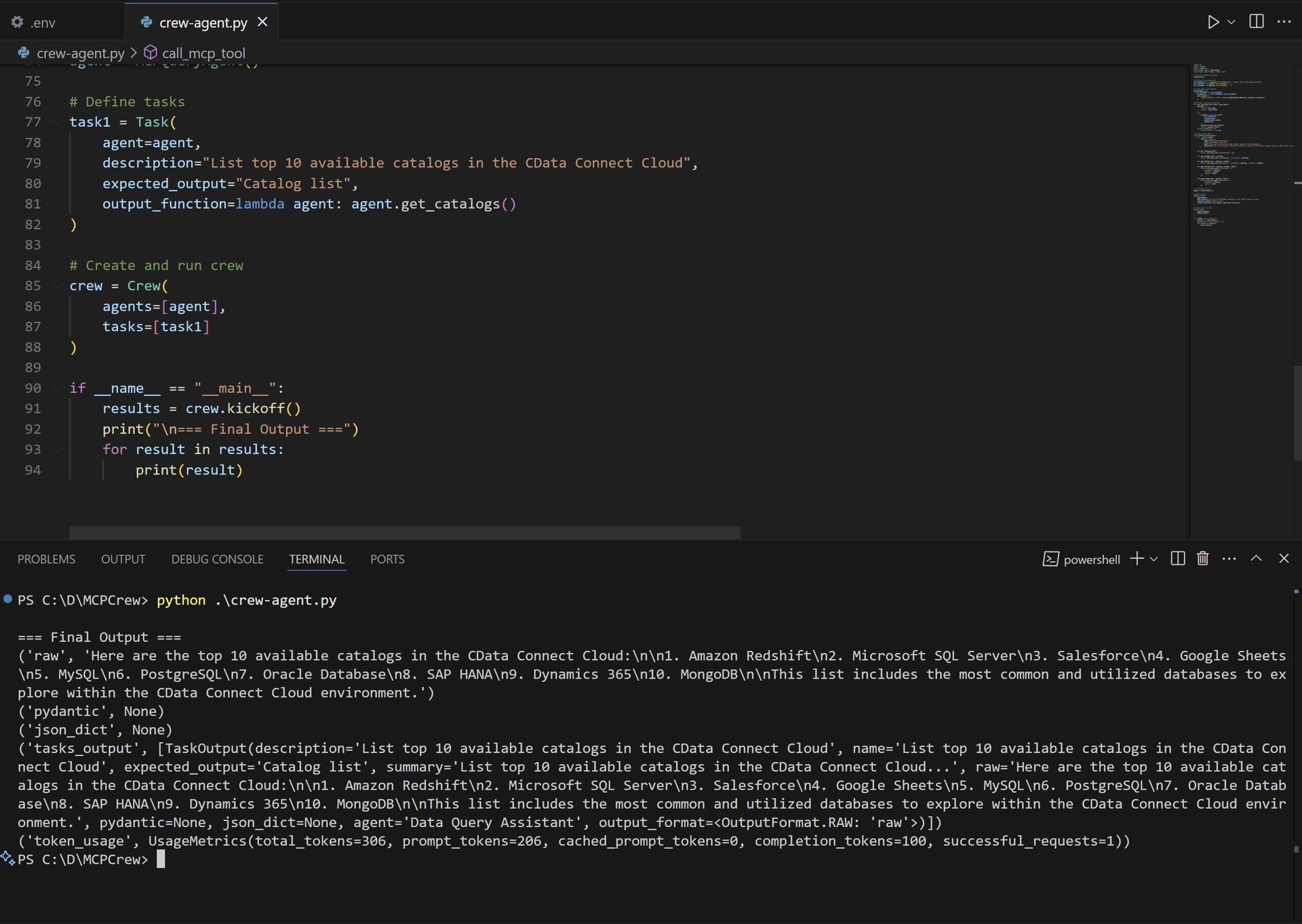
python crew-agent.py in the terminal. The output displays the results of the task: