

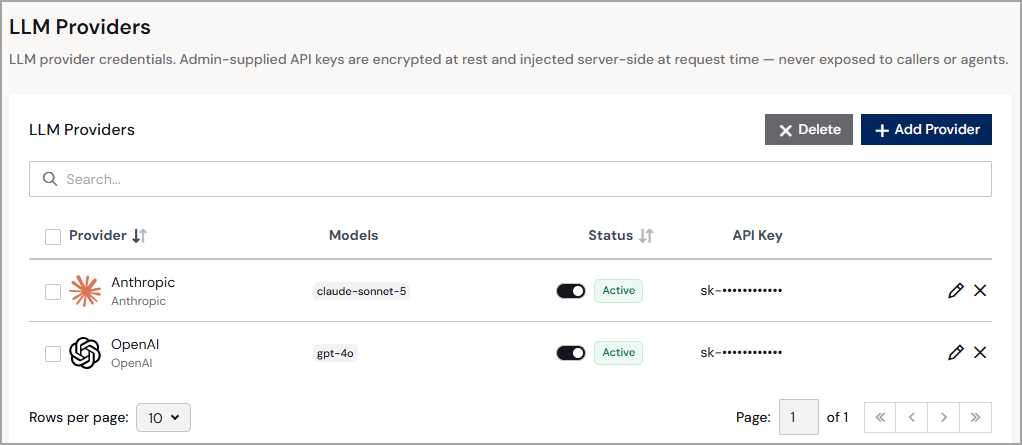
- Provider—the user-friendly name and type of the LLM provider.
- Models—the LLM you are using (for example, gpt-4o or claude-sonnet-5).
- Status—the status of the LLM provider: Active or Inactive.
- API Key—a masked representation of the API key obtained from the LLM provider. The API key cannot be edited after the provider is registered. To update an API key, delete the provider and re-add it.
You must be have a system role of Administrator to add, edit, or delete providers. Non-administrators can view this page but cannot make any changes.
Add a Provider
For each provider, obtain your API key from that provider’s developer console before registering.
1
Click + Add Provider. An Add LLM Provider dialog appears.
2
Enter the following information about the provider (Step 1):
- Name—enter a friendly name for the provider.
- Provider—select a supported provider type.
- Override Base URL—select this to use your own address (such as a company proxy) instead of the provider default. This option is not available for Azure OpenAI or Custom providers, which always require a Base URL.
- Base URL—enter the base endpoint for the provider, for example, https://proxy.example.com/v1. This field is editable only when Override Base URL is selected or when the provider is Azure OpenAI or Custom. Otherwise, it displays the provider default. See Base URL Requirements.
- API Key—enter the provider’s API key.
3
Add the LLM models to use for the provider (Step 2). Click + Add Model and enter the model name. Repeat to add additional models.
4
When you are finished adding models, click Add. The LLM provider appears on the LLM Providers page with a status of Active.
Base URL Requirements
Unless you select Override Base URL, Connect AI uses the default base URL for the provider:
If you override the base URL, or use an Azure OpenAI or Custom provider, follow these rules:
- OpenAI and Anthropic–include the version path, for example, https://proxy.example.com/v1.
- Cohere–use the host only.
- Google Gemini–end the URL before
/v1beta. - For all providers, do not include a query string, fragment, or user name and password. The exception is Azure OpenAI, which uses
?api-version=.