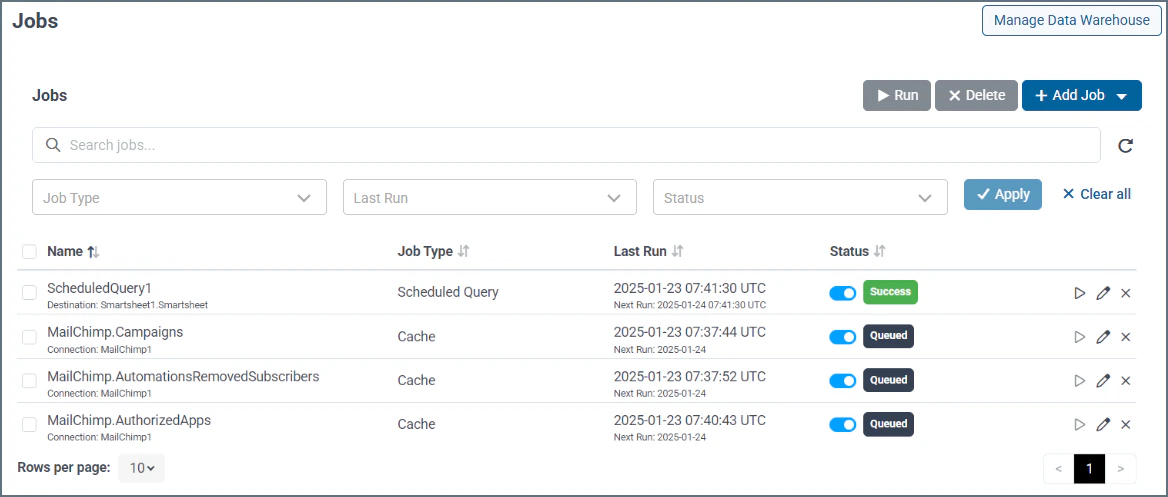
The Connect AI caching feature allows you to select tables to be cached, or saved to a database. Connect AI then fetches data for the selected tables on a scheduled basis, ensuring swift and reliable access to data whenever you need it.
Note that when you enable caching of data, Connect AI runs database queries against the cached data, not the live data. The cached data is stored in a PostgreSQL database, which you must set up before using the caching feature. You can set up the data warehouse for your cached data by clicking Set Up Data Warehouse on the Jobs page. This takes you to the Add PostgreSQL Connection page.
Once the data warehouse is set up, you can manage it by clicking Manage Data Warehouse at the top of the Jobs page. See Caching for details.
The Connect AI scheduled queries feature allows you to write queries in Data Explorer and schedule them to write data to a variety of supported destinations based on a set schedule. Before you use the scheduled queries feature, you must set up a connection that contains the destination tables for the scheduled queries. See Scheduled Queries for details.
The Jobs page contains the following information about each job:
- Name—the name of the job. For cached jobs, the job name is the table name. For scheduled queries, the job name is user defined.
- Job Type—The job type, which is either Cache or Scheduled Query.
- Last Run—The last time the job was run, and the next scheduled run.
- Status—The status of the job, which can be one of the following:
- Success—the job completed successfully.
- Failed—the job was unsuccessful. Click anywhere in the job to open the Edit Job page. Edit Job displays details about why the job failed.
- Running—the job is in progress.
- Canceled—the user canceled the job.
- Queued—the job is queued to run at the time specified in Next Run.
The toggle switch in the Status column indicates whether the job is enabled or disabled. You can disable a job temporarily without deleting it.
- Job Actions—The icons in the last column represent the various actions you can perform on a job.
- Run (▷)—Run the selected job immediately. You can run several jobs at once by selecting the jobs to run and clicking the Run button on the top of the page.
- Edit (🖉)—Edit the selected job in the Edit Job page.
- Delete (🗙)—Delete the selected job. You can delete several jobs at once by selecting the jobs to delete and clicking the Delete button at the top of the page.
Click +Add Job to add a new cache job or scheduled query. Note that you cannot add a cache job until you set up the data warehouse.
Filtering
The section above the jobs table allows you to filter jobs by name, job type, last run, and/or status.
- Name—displays only jobs matching the job name.
- Job Type—select whether to display only cached jobs or only scheduled queries.
- Last Run—displays only jobs that were last run in the given date range (such as the last 7 days) or a custom date range selected from the date picker.
- Status—displays only jobs that have a certain status (success, failed, running, canceled, or queued).
Click Apply to apply the selected filter(s) to the jobs table and perform a search. Click Clear all to start over. Last modified on June 1, 2026