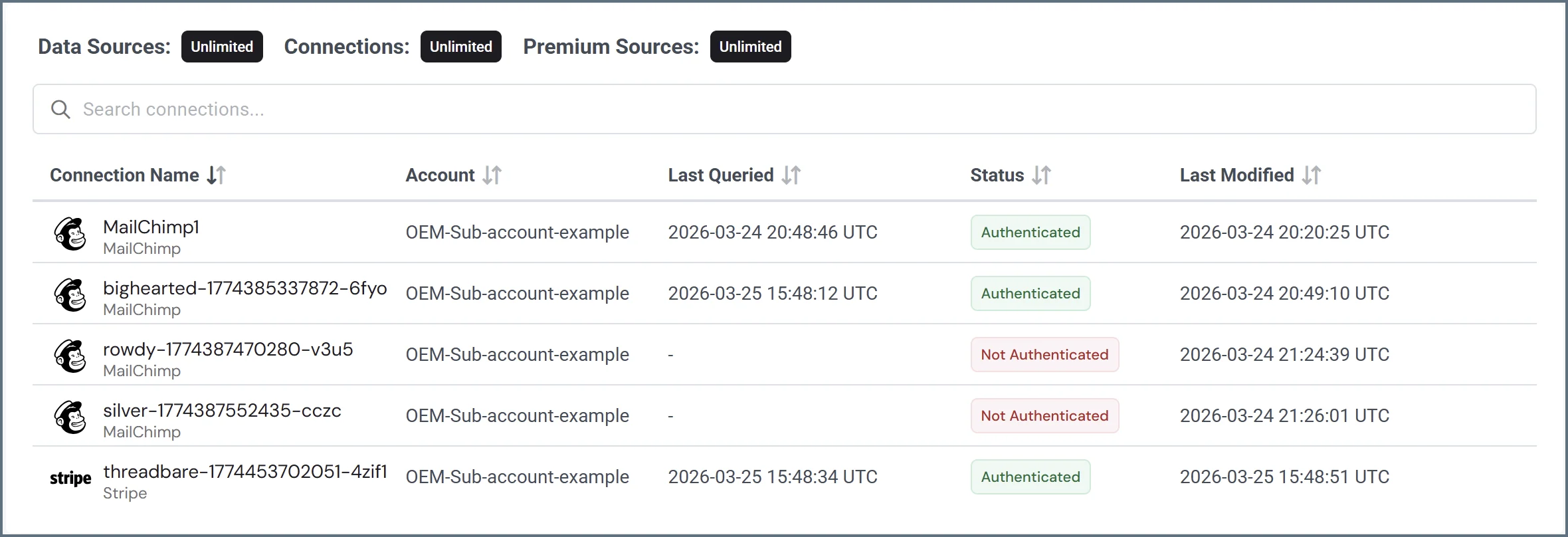
The Sources page contains the following information about each connection:
- Connection Name and Data Source—the user-defined name of the connection and the data source type of the connection. This column also contains an icon indicating that the data source supports custom reports.
- Account—the sub-account using the connection.
- Last Queried—the last time an end user queried the data.
- Status—The status of the connection, which can be one of the following:
- Authenticated—the connection to the data source is successful.
- Not Authenticated—the connection was created in Connect AI, but is not successfully connected to the data source. You can return to the connection’s edit screen to authenticate the connection. Note that Query users need to contact an administrator to authenticate a connection.
- Conditional—the connection is conditional based on the global settings and tables added to the connector. This occurs with the API connector.
- Last Modified—the date and time an end user last modified the connection. Click the user icon next to the date and time to display the user who last modified the data.
Last modified on April 30, 2026