> ## Documentation Index
> Fetch the complete documentation index at: https://docs.cloud.cdata.com/llms.txt
> Use this file to discover all available pages before exploring further.
# Playground
> The ***Playground*** page enables you to harness AI to get answers from your connected data. The Playground interface provides connection assistance to many common data sources, such as Jira, GitHub, and Slack. Once you are connected, you can ask natural-language questions about the data in the sources.
## Connect to Your Data
Connect AI's Playground allows you to connect data sources to CData's remote MCP server and obtain insights from your data in real time without a third-party integration tool.
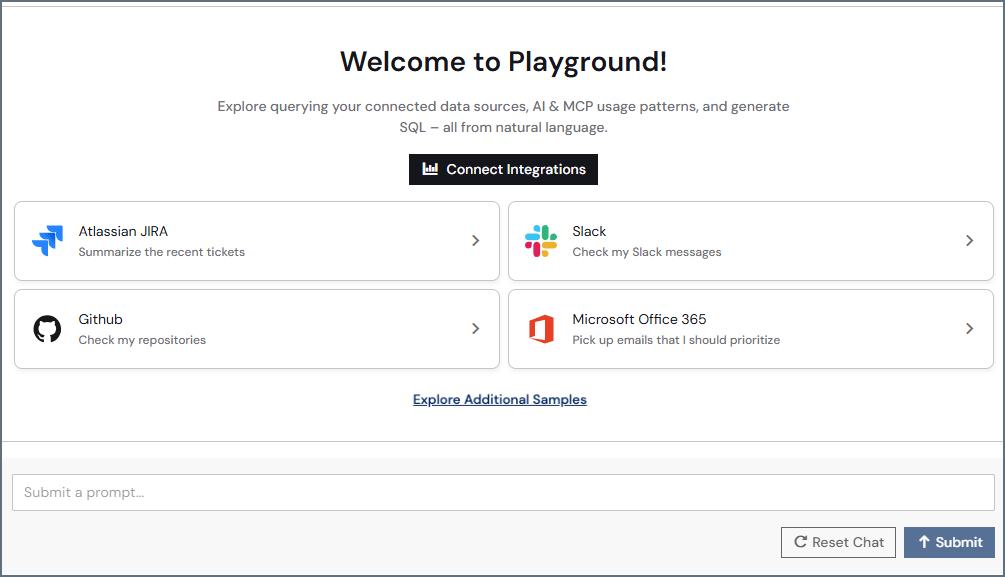 The home page of Playground contains commonly used data sources. Click **Explore Additional Sources** for more options. Click a source, and if the source is not already connected, Connect AI guides you through the appropriate steps to connect the source.
Click **Connect Integrations** if you want to use a third-party integration tool (such as ChatGPT) to query your data rather than Connect AI Playground.
For example, click the **Atlassian Jira** tile. If you are not yet connected, the Playground AI asks for your Jira URL to connect to the account. Once you submit a valid URL, the AI creates the Jira connection and asks you to authenticate it using OAuth. Save the connection.
The home page of Playground contains commonly used data sources. Click **Explore Additional Sources** for more options. Click a source, and if the source is not already connected, Connect AI guides you through the appropriate steps to connect the source.
Click **Connect Integrations** if you want to use a third-party integration tool (such as ChatGPT) to query your data rather than Connect AI Playground.
For example, click the **Atlassian Jira** tile. If you are not yet connected, the Playground AI asks for your Jira URL to connect to the account. Once you submit a valid URL, the AI creates the Jira connection and asks you to authenticate it using OAuth. Save the connection.
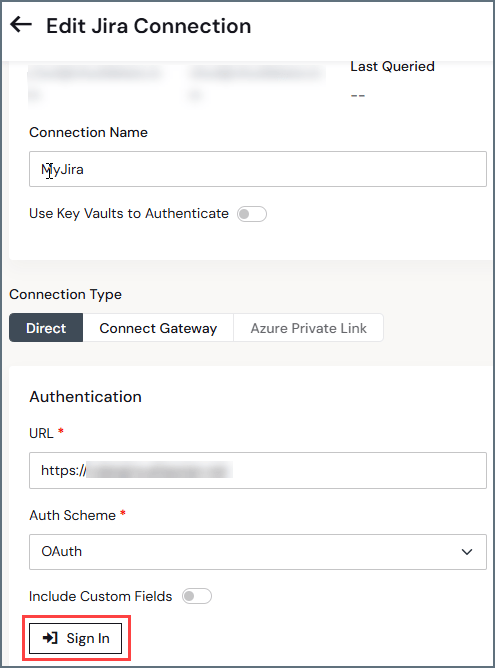 After you set up the Jira account, the Playground runs a sample prompt to make sure you are connected to the data source, such as "Give me the 5 most recent tickets created in Jira and give me the summary." When the prompt is successful, submit your own prompt. The remote MCP server works to access the relevant catalogs, schemas, and tables. The Playground might prompt you for more information to narrow down the data you need.
You can expand the results of the prompt to obtain details about how the AI tools accessed the data:
After you set up the Jira account, the Playground runs a sample prompt to make sure you are connected to the data source, such as "Give me the 5 most recent tickets created in Jira and give me the summary." When the prompt is successful, submit your own prompt. The remote MCP server works to access the relevant catalogs, schemas, and tables. The Playground might prompt you for more information to narrow down the data you need.
You can expand the results of the prompt to obtain details about how the AI tools accessed the data:
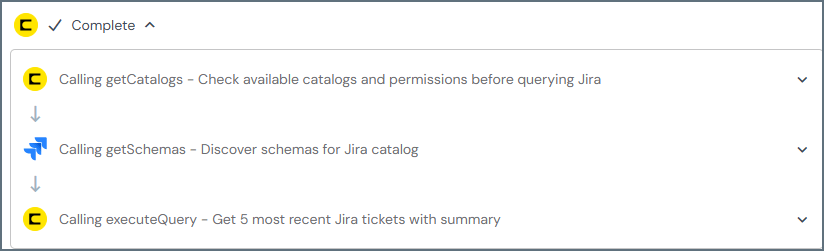 In the example above, the prompt called the tools `getCatalogs`, `getSchemas`, and `executeQuery`.
Click **Reset Chat** to return to the Playground main menu and connect additional data sources.
## Chat Records
Chat records are saved for 30 days so you can return to them later. Click the three dots to the right to rename your prompt or delete it permanently.
## Examples
The following are some of the questions you can ask Playground about your data:
* ***In my Salesforce connection, which deals have we closed in the past month, and what is the total?***
* ***In my LinkedIn Ads connection, summarize the performance for the last 30 days by campaign.***
* ***Which e-commerce products generate the highest gross margin according to NetSuite?***
* ***Identify Salesforce stalled opportunities and explain why they're at risk.***
For a more complete list of prompt ideas, see the CData [prompt library](https://www.cdata.com/ai/prompt-library/). You can filter prompts by data source.
## Ask AI to Search the Documentation
Playground also lets you ask questions about the Connect AI documentation. For example, you can ask Playground: "How do I connect to my Salesforce data?" or "How do I change my email address?" Playground might ask follow-up questions to further assist you.
## Limitations
Playground operates within specific boundaries, as follows:
* **Permissions**: Access to data, including the ability to run queries, is based on catalog permissions granted to the user. Tools such as `getSchemas`, `getTables`, `getColumns`, `getCatalogs`, and `executeQuery` are only accessible with sufficient catalog permissions.
Playground does not perform data deletion queries under any circumstances.
* **Query Limits**: Only SELECT, INSERT, UPDATE, and stored procedures are supported. Query responses also cannot exceed 100 rows.
* **Execution**: Actions are limited to the Connect AI ecosystem. Actions or queries outside of the system are ignored.
* **Privacy and Security**: Playground accesses only relevant data and metadata within the Connect AI system. It does not query data or systems outside of authorized Connect AI catalogs.
In the example above, the prompt called the tools `getCatalogs`, `getSchemas`, and `executeQuery`.
Click **Reset Chat** to return to the Playground main menu and connect additional data sources.
## Chat Records
Chat records are saved for 30 days so you can return to them later. Click the three dots to the right to rename your prompt or delete it permanently.
## Examples
The following are some of the questions you can ask Playground about your data:
* ***In my Salesforce connection, which deals have we closed in the past month, and what is the total?***
* ***In my LinkedIn Ads connection, summarize the performance for the last 30 days by campaign.***
* ***Which e-commerce products generate the highest gross margin according to NetSuite?***
* ***Identify Salesforce stalled opportunities and explain why they're at risk.***
For a more complete list of prompt ideas, see the CData [prompt library](https://www.cdata.com/ai/prompt-library/). You can filter prompts by data source.
## Ask AI to Search the Documentation
Playground also lets you ask questions about the Connect AI documentation. For example, you can ask Playground: "How do I connect to my Salesforce data?" or "How do I change my email address?" Playground might ask follow-up questions to further assist you.
## Limitations
Playground operates within specific boundaries, as follows:
* **Permissions**: Access to data, including the ability to run queries, is based on catalog permissions granted to the user. Tools such as `getSchemas`, `getTables`, `getColumns`, `getCatalogs`, and `executeQuery` are only accessible with sufficient catalog permissions.
Playground does not perform data deletion queries under any circumstances.
* **Query Limits**: Only SELECT, INSERT, UPDATE, and stored procedures are supported. Query responses also cannot exceed 100 rows.
* **Execution**: Actions are limited to the Connect AI ecosystem. Actions or queries outside of the system are ignored.
* **Privacy and Security**: Playground accesses only relevant data and metadata within the Connect AI system. It does not query data or systems outside of authorized Connect AI catalogs.